Showing posts with label Acorn. Show all posts

Friday, 11 November 2022

Looking at the Acorn A7000+ in 2022

 Back in 2010, I made a little post about my Acorn A7000+, where I mentioned my past experiences with the machine and its OS.

The other day, I thought to myself that I should get it down and get it powered on again in order to try some things out with DNS. Before pumping mains electricity through it, I thought it would be a great idea for me to take a look inside it because it hadn't been powered on for about four years.

And I am glad I did.

During that four year break, the CMOS battery attached to the board decided to leak and its contents were deposited on the board itself. This requires me to replace the battery and repair the damaged area, This is the story of how I achieved this.

The A7000 and the A7000+ are very compact machines for their period. Despite the outward appearance of the case, which is only really that large due to Acorn recognising that a CD drive would be used at some point, the system itself is quite small and has a remarkably low profile. I am not sure if Acorn had different hardware options in mind when they designed the board etc, but I do know that this design made its way in to a lot of set top boxes.

The low profile is achieved, in part, due to the use of passive cooling - no heatsink or fan is on the CPU here, which is in stark contrast to the time in which this article was written. At the present time, heatsinks and fans can be quite large, and water cooling solutions are becoming more popular. When this machine was made, not having a fan was still something that happened - but more and more systems were getting fans installed at the factory.

The CPU in the A7000+, the machine I have, is probably better being described as being an SoC. I found the datasheet for it here. The main areas it controls are as follows:


This makes the layout on the motherboard quite clean and uncluttered and allows for it to be as small as it is.

This model also provides two methods for expansion in the form of a backplane connector for a hardware format named "podule" by Acorn and a standard internal network connector that is compatible with past Archimedes models. Sadly, Acorn didn't think that networking was going to be such a big deal for their ecosystem, in my opinion, at least. I think it has always remained an after thought.

For the backplane connector, I dont really remember much being commercially available for it at the time. However, these days there are quite a lot of things that are available to buy or to build yourself, including USB interfaces and GoTek interfaces. Sadly, due to the design of the board, you cannot use a CD drive and the backplane interface at the same time. I think this was an oversight and the main reason why I didn't see many expansions for it. These machines were intended to be used in schools, and schools were always going to go for media rich CD ROM based software over an expansion card.

The network cards were useful though, a lot of them at the time supported both Ethernet and BNC, which was really useful. But they were expensive, and to the best of my knowledge still are. The one I have now is just Ethernet, but works perfectly well on my network.

As standard, the A7000+ came with 8MB of RAM from the factory soldered to the board. It also had one memory expansion slot for a SIMM - anyone remember them? They were the bane of PC owners lives, tantalising us with their ever lowering prices. Always knowing that we would have to buy two of them at a time. However, the A7000+ didn't have that drawback, you just needed one to increase the available memory, and could support up to 128 MB, it also supported EDO RAM as well as FPM. This was a pretty big deal back then, EDO was the fast RAM that the cool gamers would have in their systems.

When it came to storage, it came with a 3.5" floppy drive as standard - the mere thought of not having one of these was pure ridiculous, and an IDE hard disc. I think there were various SKU's offering different amounts of HDD space and expanded memory, as well as with a CD drive option. Mine had come from a school, and still has the factory HDD, but the CD drive currently installed is mine (it just happens to be the first ever CD burner I ever owned...). One of the interesting things about RISC OS, at least up to 4.02, is that you have to tell the OS if you have a particular type of drive installed. It doesnt seem to be able to auto-detect them in the same way that a lot of contemporary x86 based desktops would have been able to.

Other than the network port, the A7000+ also has one DB9 RS-232 serial port and one printer port. It also has a PS/2 port for the keyboard and mouse separately. Another one of the oddities with RISC OS is its dependency on having a three button mouse. Annoyingly, the context menu appears on a middle click in this OS as opposed to a right click in Windows. At the time, PS/2 mice with a scroll wheel were still not ubiquitous. Whilst we cannot imagine a mouse not having a wheel now, there were still a lot of places that didn't automatically get wheel mice as soon as they became available, these places include offices and schools who typically only replaced mice as they broke. So if you didn't have an Acorn mouse, or it broke and you couldn't get a replacement, you might have been in quite a pickle. It happened to me when I was testing the machine out later on.

One really quirky feature of RISC OS that, quite frankly, annoys me, is that you need to define a monitor configuration in order to take best advantage of its video capabilities. To this day, I am not really quite sure why you have to do this, naturally all of the relevant Acorn monitors are supported and I have seen them in action. So I know how wonderful the OS can look, and at the time this has to have been the best looking OS on the market. You do get a stock 640x480 mode, but you cant change any visual settings. So lets see if we can change that.

Back to the problem at hand, I need to deal with the battery and the damage it might have caused. Opening up the case reveals that the leak has been largely localised to one specific area, covering the case and the board. So I needed to dig the board out from there to start working on the problem. As this meant taking the whole machine apart, I decided to test out the PSU at the same time and replace a bunch of missing screws etc.
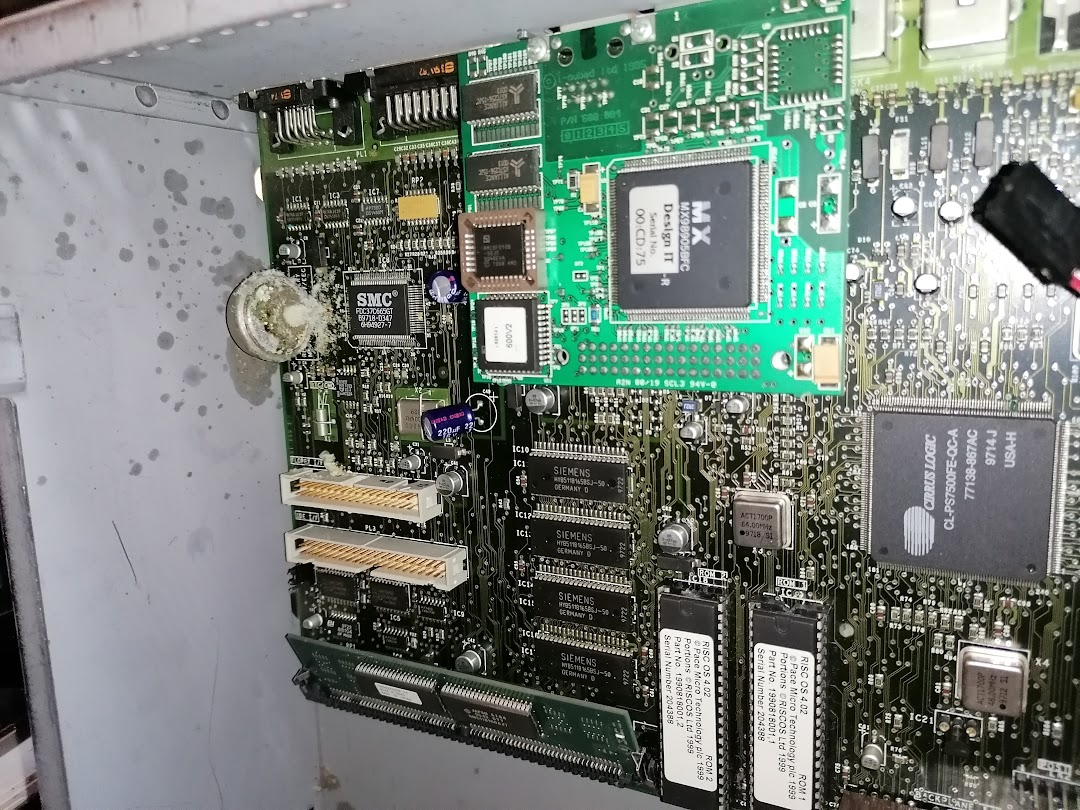

With the drive chassis and the drive cables removed, I was able to extract the motherboard from the case. As we are dealing with a battery leak, I am using white vinegar. According to Google and "people on Facebook", this neutralises the acid from the battery and stops further damage? I am willing to believe it without checking it for myself, you can almost see it working at times. I sprayed some vinegar on the effected area in the case and set it to one side whilst I took a look at the motherboard. You can see in the picture that it is localised to one specific area, which is really quite lucky. Also, you can see that the silicon looks amazing for a device this old. This specific area holds the CMOS memory and the Super IO controller for the floppy drive. The battery was here to provide power to the CMOS memory.


After looking at the affected area under a microscope, I realised that the damage may simply be superficial at this stage - which would be very lucky for me. So after carefully cleaning the area with some vinegar and a toothbrush, I was able to remove most of the gunk caused by the leaky battery. With that done, I was able to heat up the iron and remove the battery itself from the board.


I think the quality of the product helped a lot when it came to cleaning up the mess, that and being able to catch it at this stage. After cleaning up from the removal of the battery with some IPA I was left with a nice, clean set of holes for attaching a replacement. Looking at the battery itself, it looks as it one side of it failed, and its guts spilled out.


The negative side was covered in the same crust that was on the motherboard, but the positive side looked almost as if it were brand new. Obviously, the negative side was the one pointing at the rest of the motherboard. There was no chance life would let that one pass by :).

Now that I have removed the cause of the damage, and the superficial damage, I need to replace the battery with an equivalent that is less likely to leak. I should also mount this battery somewhere that, if it does leak, then it would be less likely to cause any damage to any part of the machine. But this post is getting a bit long, so I think a part two is in order.

Friday, 24 September 2010

My Lovely A7000+

Well, it took a massive effort on my part to get my venerable A7000+ up and running again. The machine itself is about thirteen years old and didn't like booting it's original OS. One of the nice things about the A7000+ and pretty much all of it's relatives is that the operating system itself is stored on ROM. You don't need a hard drive in it all really (but it is better if you do). This box was running RISC OS 3.71 the last time I tried to get it up and running, however after years of being stored in the garage, it got a little temperamental. After some careful refurbishment, I ended up having to get a new OS installed.

There isn't that much development happening for RISC OS machines at all at the moment, I managed to find some RISC OS 4 ROMs on Ebay which I fitted myself, after a mornings worth of trying to remember how the network setup works in RISC OS I finally managed to get it on to the Internet. I had planned to do this post from the A7000+ itself, but the supplied web browser just doesn't like Blogger, which I think is a shame. I have seen better browsers for RISC OS, but unlike mainstream OS's they are not free.

There are lots of cool things you can do with a RISC OS machine on a network, but I din't think there is any jobs going in the field just now. I used to work in a school, which at the time had hundreds of these machines. Unfortunately, by this point (2001) there was very little call for the use of RISC OS itself, instead we implemented a Citrix server to provide a Windows session directly to the box. It was a sad thing for me to see really, my first ever computer was an Acorn Election (more posts to come on that one I think) and I grew up using the Acorn Archimedes. the A3000

Tuesday, 7 September 2010

Old Tech Is Great

I have been struggling for a while now from the lack of a decent smartphone. I have been using Nokia phones since 2006, prior to that I used Ericsson devices. Now I am stuck with a pointlessly tiny touch screen phone that has no wifi or decent calendar.

So, how am I to cope when I see all these grinning people with shiny new Android devices? Not to mention the fanboys exclaiming madly about how the iPhone 4 is the second coming...

What do I do then? Well, I turn to a gadget I bought around ten years ago to carry my calendar and contacts with me. This device is the Psion Series 5. I have blogged about old tech in the past, I have an almost working Acorn A7000+, an Acorn Electron as well as a few old consoles. My A7000+ is completely functional, running RISC OS 3.7 at the moment, but I am having trouble getting it connected to the Internet, anyway, that's a post for another day...

So, this Psion device. I don't think many people will remember them all that much, as far as I can recall they were never massive hits with the consumer, despite getting very good reviews. When I first got mine, they were still relatively expensive second hand, so I got myself two damaged ones and took them apart to make one working version. However, back in those days I didn't really need an organiser like that - it wasn't like I needed to keep a calendar of things to do, meetings and peoples contacts. However nowadays I do. On my present phone, I cant do this very easily, the only other device I can use for a calendar is my iPod Touch - but Apple seem to have nobbled first gen owners who don't want to upgrade iOS (and why should I? It is mainly updates for the next gen models - not mine). So, I have gone retro geek chic and pressganged my old Series 5 into action for the first time in a decade (alomost).

When I first started playing with them all those years ago, I found it very hard to get it speaking to Windows XP Pro. I am using Windows 7 Ultimate now, so I was a little concerned that the Psi-Win suite that comes with the device would not work. However, after a very brief install period it all works fine. Next on the list was the serial connection, the Series 5 doesn't use USB, it has either an IR port or mini RS232 jack for connectivity. Again, back in the day of Windows XP this was troublesome for me, but again on Windows 7 it works like a dream. Now I can sync my 10 year old Psion Series 5 with Outlook 2010 with no problems at all!

Another interesting thing about this device is it's heritage. The Psion Series 5 runs an operating system called EPOC - this was the direct ancestor of Symbian. If you look at older smart phones like the Ericsson R380 World Phone, you will notice that the interface is almost identical to that of a Psion Series 5. The same thing can be said about the Nokia 9210i as well, the UI is almost identical to EPOC, right down to the soft buttons on the side of the screen (on a Psion, these were either touch sensitive or a soft menu button).

In fact, Ericsson made their own version of the Psion Series 5MX (a slightly updated version) to work seamlessly with Ericsson phones called the Ericsson MC128. I haven't seen any of these devices at all on Ebay, if I ever did I would snap one up in an instant as I have an Ericsson R320 smartphone (count afford the R380 when it came out).

Anyway, the software that Psion created, EPOC, gave way to Symbian. But there is one interesting thing about this OS. It is very similar to that of RISC OS, the two are not directly related. I know that a RISC OS/EPOC Palmtop device was planned, it was called the Osiris but I don't ever remember it getting released.

The only downside I can see with this device these days is the monochrome screen and the lack of a decent messaging suite straight out of the box. I think the Series 5 MX and Series 5 MX Pro addressed these problems though.

So, lets take a look at my Series 5 in it's glory:


The connector at the back is the mini RS232 jack, on the left is a power cable (I have never seen an official Psion power cable for these, so I am actually using a Nokia ACP-12X charger). The Series 5 is pretty good on batteries, but if you are using cheap rechargeable ones like me, it will gobble them up in seconds.

Now for the device opened:


The Series 5 has a very clever way of providing a decent keyboard for typing, when you open it, the keyboard slides out towards you, pushing the screen back to a decent angle. I think this is one of the most ingenious designs ever for a PDA/Netbook.. You can see under the screen and on the left of the screen there is a silver strip. This is touch sensitive and will open up any of the built in apps. You can also control the screen etc from the left hand controls. On the right, there are some touch sensitive soft menu items, such as the control panel.

Now, underneath the device:


I included this shot to show you the last little surprise this device has. You can just about make out that there is a small black panel there - this clever little thing actually hides the controls for a dictation mode the Series 5 offers. With the device closed, you can actually slide this back and record what ever voice memo you need. If you open the device up, you will get this recording presented to you for playback. I am not sure how many people actually use voice memos these days, but you can see that the Series 5 definitely had a lot of thought and effort ploughed into its design.

One final thing about the Series 5, it even comes with it's own development environment installed as standard. The device offers OPL allowing you to create your apps and scripts for this device. It is actually supported in the Sony Ericsson P800/P900 as well as the Nokia Series 80 Commincators (although I do not remember seeing the development editor available in these devices.

So that is it, the Psion Series 5. I think it is as much of an oddity these days as it was when it was first released. It is a fantastic example of British engineering and was definitely ahead of it's time on it's release considering the popularity of netBooks now on the market, not to mention our smartphones...

I will be using mine for a little while yet untill I can track down the last Psion netbook to be released somewhere.

Sunday, 11 October 2009

Old School Computing, in its most truest sense.

Recently, I posted about the excellent machines that a rejuvinated Acorn Computers are now selling on the Internet. It got me thinking, anyone who went through an English school suring the late 80's and early 90's should have at least some distant memory of these rather fine machines.

For those that don't know, Acorn was one of the UK's only computer builders, a lot of people wont even remember them these days, but the ones who do will no doubt have fond memories of the BBC Master and probably playing Chuckie Egg on it.

Acorn made computers from 1978 to 1998, when they finally succumbed to the dominance of the PC architeture. There is loads about them on Wikipedia: http://en.wikipedia.org/wiki/Acorn_Computers, there are loads of these machines about now, mainly because of the sheer amount that were installed in schools across the country for so long. The first ever computer I owned was an Acorn Electron back in the early 80's. My parents thought that it might improve my hand/eye coordination to play games on it!! I think what many people wont realise is the lasting and prominent impact Acorn Computers have had on our everyday lives. Not only did they build their own computers, but they made their own OS, architecture and hardware. Acorn are resposible for developing the ARM processor, a peice of hardware that pretty much everyone carries around in their pocket, powering their mobile phone. It would be a fair bet to make that there is also one in your set top box at home, powering Sky, Virgin Media or your freeview/sat tuner. It doesnt start and end there either, ARM processors powered another venerable computing device towards the end of the 90's, the PSION Series 5. This is a very notable device as it was the precursor to the S60 mobile phone platform, the OS that powered it was called EPOC and it pretty much turned into Symbian - now things should start to be recogniseable!

With that said, I have now in front of me an original Acorn A7000+ desktop computer from a school down in England. It should run, I have powered it on and got the desktop up and displayed on my monitor. I plan to rennovate this UK computing relic to get it back up and running properly. I remember schools were using these machines right up until 2001 in some parts of the UK, this one I have here is a clear indication as it comes with an all important ethernet adapter.

One of the notable things about these machines is that they don't really need hard drives, the entire OS and all its supporting applications are stored on ROM. When you want to upgrade the OS, you simply replace the ROMs with your new set. This isn't something we see at all these days in a desktop computer, unless you are running a setup with embedded Linux.

I recall from the last time I saw an Acorn machine in operation, that it had a fully functional web browser. So, my plan right now is to get this bad boy up and running and connected to the Internet so that I can try and do some simple things like email and facebook. The example I have here, an A7000+, has a hard drive installed, as well as a CD writer, so this means I will be able to install software to it if I need to. From what I can see from the boot up screen, this machine is running RISC OS 3.7. From what I can remember, this was the last main release of the OS prior to Acorns demise, however since then there have been three seperate releases of newer OS's. In a rather different move to the normal distributions of Windows and Linux etc that we see now, a new company was formed in 1999 to release RISC OS 4. Not long after this, a seperate company release a RISC OS 5 for a seperate line of devices, but as far as I can tell this version of the OS is only for machines made by a company called Castle. This confuses me a bit, as far as I can tell this version of the OS has never really been available seperately.

But, a further twist is this, a new OS has been recently released, RISC OS 6... I have no idea how much of a departure this will be from the RISC OS I know and love. One thing that is very notable about RISC OS is that it pretty much introduced the concept of the task bar (as far as I know). This is very familiar to Apple users and now, to Windows 7 users, its a feature that Acorn introduced in 1988 though... As soon as I get this one up and running, I will start to get some screen shots up and running.

Sunday, 21 June 2009

Old School Acorn Computing

Just been doing a bit of a browse for info on my vintage Acorn A7000+ desktop when I discovered that Acorn Computers are back in business. I was impressed, however a little dismayed to see that they dont use the classic RISC OS operating system any more, but instead plump for Vista, or other versions of Windows. Their site is here: http://www.acorncomputers.co.uk/index.htm, and to be honest the devices they are selling do seem to be quite attractive. They come complete with the old school Acorn logo all over them, which just adds to the appeal.

I think anyone who still has fond memories of using Acorn and BBC computers when they were at school will enjoy taking a look at the new series of products. Of course, anyone who is still hankering for a bit of RISC OS action can take a look at Ebay, you can pick up an A7000+ very cheaply these days, some even with a network adapter. Schools are literally chucking these things out with the rubbish nowadays, unfortunately they can't even give them way to charities etc. However, if you really want the latest iteration of RISC OS, currently at version 5, check out Castle's list of products here: http://www.iyonix.com/. Personally, I dont see the need to spend almost £800 on a computer like this, but if you really are an enthusiast you will snap one right up.